LINE integration
LINE inquiries, registered in your business system.
Requests and inquiries received on your LINE Official Account are registered automatically in Salesforce, kintone, HubSpot or Google Sheets. We build the integration with you, from requirements to launch, to reduce copying and double entry. If you also need a dedicated app, we can discuss that too.
Inquiries from your LINE Official Account, registered automatically in Salesforce, kintone, HubSpot or Google Sheets.
For businesses already using Salesforce, kintone, HubSpot or Google Sheets.
Your integration requirements can be undecided. There is no obligation to order after the consultation.
This simple demo matches predefined words to fields. For a real integration, we agree on the input method and records in advance.
I would like to discuss a quote.
- Company
- Sample Co.
- Request
- Quote inquiry
- Reply via
- LINE
Record added · team notified
Pick a message or type your own to try the flow.
Your text is not sent or stored. It is processed only on this screen.
Sample interface · no data sent
What fits, and what we do not take on.
We connect LINE to a business system you already use. The required features can be clarified during the consultation.
A good fit
- LINE and your business system run separately, causing re-entry and duplicate work
- You already use Salesforce, kintone, HubSpot or Google Sheets
- You have no in-house IT contact, or not enough hands
Not a fit
- The business system to connect to is not in place yet
- You only want a LINE official account set up
How the integration works
From a LINE inquiry to a notified team.
Where does a message received on LINE go before it reaches your business system? Here are the four stages.
- 01
Receive on LINE
Receive requests through a form opened inside LINE.
- 02
Check the details
Check for missing information and duplicate submissions.
- 03
Register in your system
Register the agreed fields in the system you already use.
- 04
Notify the right person
Notify the person in charge so they can follow up.
Try a demo that fits your workflow
Screenshots of our working demos with fictional data, not client deployments or measured business results.
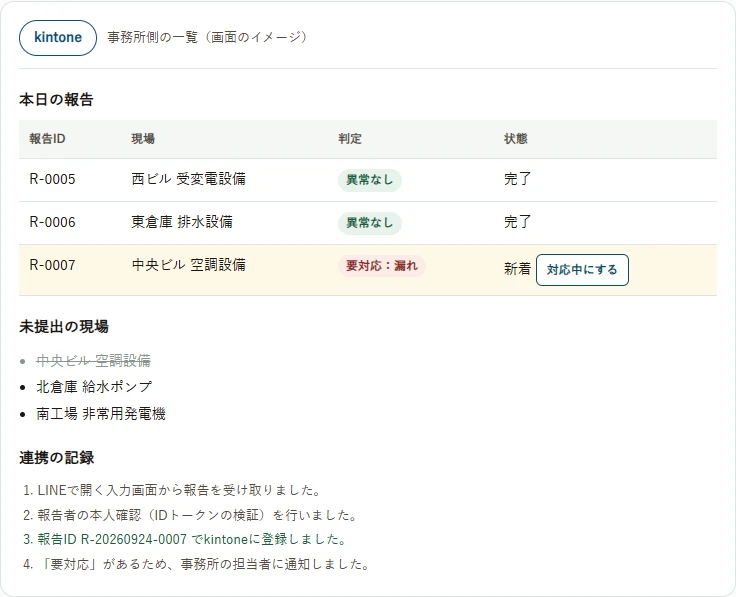
Contractor field reports
LINE × kintone
Collect inspection results, identify missing reports and issues, and try resending after a failed submission.
Try this demoDemo in Japanese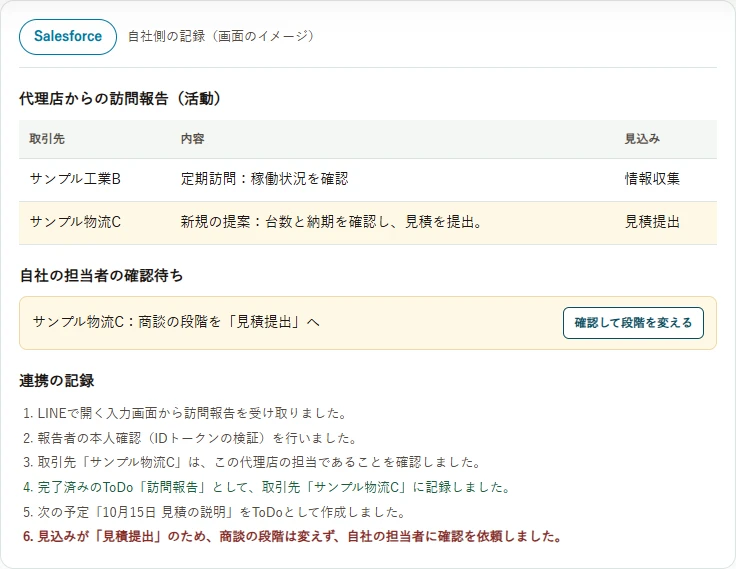
Partner visit reports
LINE × Salesforce
Share visit notes and next steps. Try internal approval before changing an opportunity stage.
Try this demoDemo in Japanese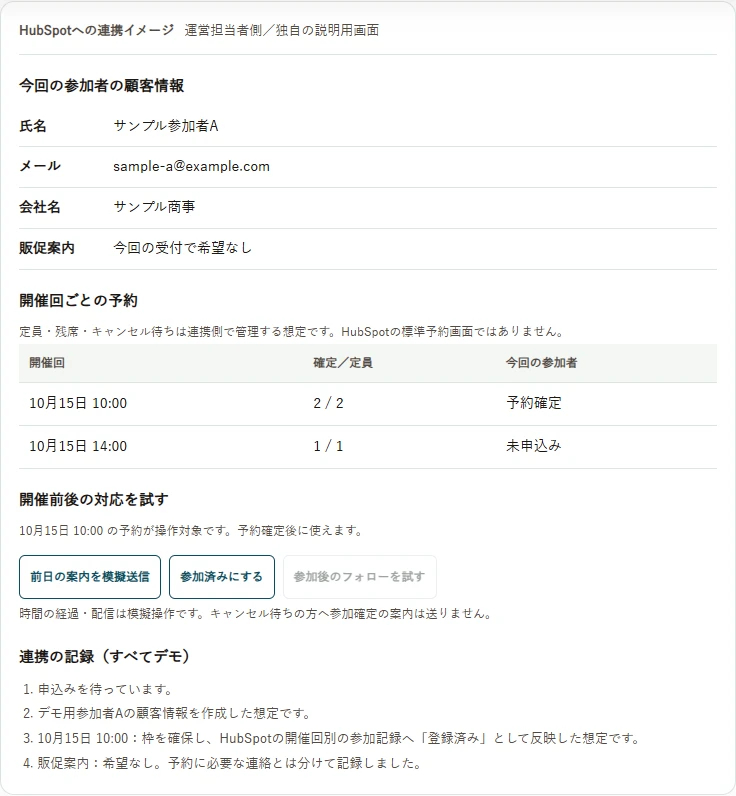
Seminar booking
LINE × HubSpot
Connect bookings and attendance to contact records. Try full sessions, duplicate prevention and follow-up.
Try this demoDemo in JapaneseChecks before handover
Reviewed before delivery, with everyday use in mind.
From missing or duplicate records to personal data and handover, we review the points needed for operation, including parts built with AI.
What we check once the integration runs
Missing or duplicate records
Records are not lost or duplicated when a connection drops or the same inquiry arrives twice.
Personal data
Names and contact details from LINE are stored only as needed, and only where agreed.
Keys and permissions
Connection keys are not exposed in screens or code, and no account has more access than it needs.
Specification changes
When LINE or your business system changes, it is clear what needs to be updated.
Handover
If the person in charge changes, the setup and operating steps can still be followed.
Drawing on more than 20 years in IT and development, we review every part by hand, including anything AI produced, before handing it over.
Begin with how people will use it.
Who uses it, when, and why? We start from your current workflow to decide which fields to register and when to notify.
About Wa-Node- 01
Understand
Clarify the current situation, goals and priorities.
- 02
Make it concrete
Agree on screens, scope, cost and timing before work begins.
- 03
Check and deliver
Verify interactions and integrations, then support launch and handover.
Start with “could this work?”
Tell us what you know and what you are still figuring out.